

Video’s basically mandatory now, whether you’re a solo creator, a small shop owner, or someone who just wants their blog posts to get seen. Tablets, weirdly, have become a solid place to actually make that video, and AI tools are the reason the whole thing doesn’t eat your entire evening. Below: why this shift happened, what these tools are actually good for, what to check before you trust one, and a few mistakes I’ve watched people (myself included) make.
Okay, so, a few years back I tried to cut a simple product clip on my tablet. Three apps, a lost afternoon, and an export that somehow dropped half the audio. I don’t even remember which app was the culprit anymore. Today I can draft, caption, and polish something similar in one sitting, on tools that flat-out didn’t exist back then. That’s not because tablets got faster, though sure, they did that too. It’s because AI quietly ate the boring parts of editing. The parts nobody was attached to anyway.
If you hang around the Creative & Design Apps section of this site much, you’ve probably noticed a pattern already: the tools that stick are the ones that remove a step, not the ones that add a new interface to memorize. Video editing is just the newest category to go through that. Worth understanding before you pick a tool, honestly, because not all of them are built the same.
Why Video Took Over Everyone’s Content Calendar
A blog post and a half-decent thumbnail used to be plenty. Not anymore.
- Short-form video is what most platform algorithms actually want to feed people right now
- People remember narrated, visual content longer than plain text, helpful if you’re trying to explain something with more than two moving parts
- Search results increasingly show video previews next to the written stuff, so skipping video isn’t neutral, it’s a visibility hit
Writing isn’t dying, to be clear. It’s just that video got added to the list of things a working creator has to produce, usually on a deadline that’s tighter than anyone would like.
Tablets Have Quietly Become Real Editing Studios
This part actually surprised me. Tablets used to be for watching things, not making them. That’s flipped, and I’m not totally sure when.
A decent tablet, a stylus, maybe a keyboard case if you’re fussy about it, that combination gets you:
- A big enough, color-accurate screen for scrubbing a timeline and trimming by hand instead of squinting at a phone
- Enough horsepower to render short clips without the thing overheating in your lap
- Portability a laptop-plus-monitor setup can’t touch, especially if you’re filming and editing in the same afternoon
The catch, there’s always a catch, is that touch-first editing apps still make you do a lot of grunt work. Dragging clips around. Typing out captions line by line. Eyeballing whether the audio levels match. That’s the exact gap AI tools have started closing.
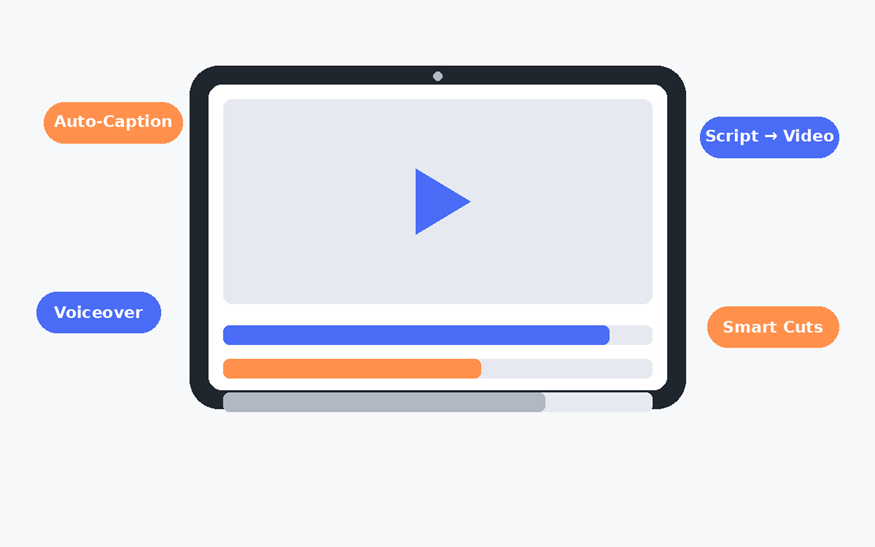
Illustration: an AI-assisted editing workflow, drafted for this article.
What AI Actually Does for Video Creators
Worth being specific here, because “AI video tool” gets tossed around pretty loosely these days, like it means one thing. In practice, the good ones tend to handle a handful of repeatable jobs:
- Turning a script (or honestly just a few rough prompts) into a first video draft, so you’re editing something instead of staring at an empty timeline
- Auto-generating captions and subtitles, this alone used to eat more time than anything else in short-form editing
- Suggesting cuts and pacing, trimming dead air without you scrubbing through every single frame
- Adding voiceover from text, which matters a lot if your recording space is, say, a spare bedroom with an air conditioner running
I tried this out myself using an AI video generator, on a pretty unremarkable afternoon, no lighting setup, no separate mic, just a tablet and a half-formed idea. What stood out wasn’t that it made the creative decisions for me. It didn’t, and honestly I’d have been annoyed if it tried. It just took the busywork off my plate so I could spend the time on pacing and message instead of dragging clips around for twenty minutes.
That distinction is the whole ballgame, really. The tools worth using speed up the boring 70% of editing. The ones to be skeptical of are trying to make your creative calls for you.
What to Look for Before You Adopt One
Not every AI video tool actually fits a tablet workflow, some are clearly built desktop-first and just tolerate mobile. A few things worth checking before you commit to one:
- Does it work properly in a mobile browser, or does it need a full desktop app to feel usable?
- Can you export in the aspect ratio you actually need? Vertical, square, widescreen, they’re not interchangeable, and re-exporting later is annoying enough that you’ll want to get it right the first time.
- How much manual override do you keep? You want to be able to fix an auto-cut or edit one caption line without redoing the whole draft.
- What happens to your raw footage afterward? Cloud tools vary wildly on how long they hold onto project files, and whether you can even pull the originals back down.
None of this is complicated. Skipping the check, though, is exactly how people end up stuck with a workflow that doesn’t fit how they actually work.
A Realistic Day-to-Day Example
Easier to picture this than to talk about it in the abstract, so, imagine you run a small shop and want three product videos out a week.
Old way: an evening gone to trimming clips, typing captions by hand, then re-exporting because the aspect ratio came out wrong for one platform. Again. With an AI-assisted setup on a tablet, it looks more like this instead, film short clips throughout the day, drop them into the tool that evening, let it draft captions and a rough cut, then spend maybe twenty focused minutes per video adjusting pacing and swapping in your own voiceover wherever it actually matters. Total time drops. But more to the point, the parts that need an actual human, tone, timing, what to say, what to cut, are exactly where your attention ends up going.
This is also where a tablet beats a phone for anything beyond the most throwaway clip. Bigger screen, easier to catch a caption overlapping a subtitle, or a cut that lands a beat too early, before it’s live instead of after.
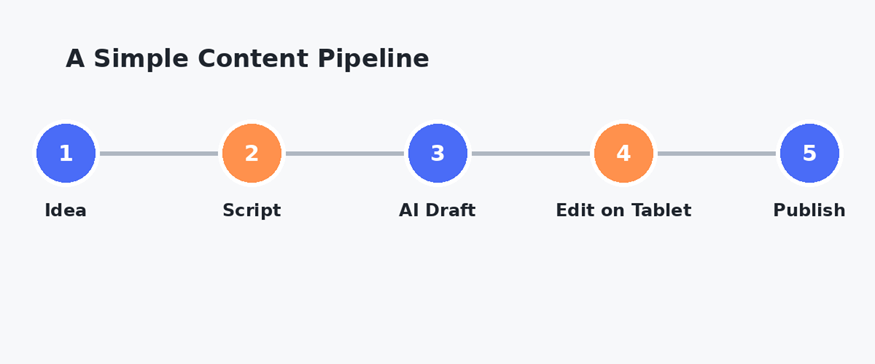
Illustration: a simple idea-to-publish content pipeline, drafted for this article.
Making the Workflow Actually Stick
A tool’s only as good as the habit built around it. A few things that made a real difference for me, in no particular order:
- Batch your raw footage first. Shoot or gather a week’s worth of clips in one go, then treat editing as its own separate task later.
- Keep a short list of go-to caption styles and intro clips. Reusing a small set cuts down on decision fatigue more than people expect.
- Review on the device you’ll actually publish from. A caption that reads fine on a tablet can crop weirdly on a phone feed, check both.
- Set a hard time cap per video. AI tools cut out a lot of manual work, sure, but it’s still easy to burn an hour fiddling with pacing if you let yourself.
Common Mistakes Worth Avoiding
A few patterns keep showing up with people newer to this, myself included, a while back:
- Trusting the auto-captions without a proofread pass. Homophones and names are where these tools slip most, every single time.
- Treating an AI-generated draft as a finished product instead of a starting point.
- Ignoring platform-specific export settings, then re-uploading a video that gets compressed into mush.
- Skipping a backup of the original footage, which is fine, right up until the one time you actually need to re-edit something.
Key Takeaways
- Video’s a standard content format now, not a bonus one, and that puts real time pressure on solo creators and small teams.
- Tablets are genuinely capable enough for real editing work, especially paired with tools that automate the repetitive parts.
- The AI video tools worth using save time on captions, rough cuts, and voiceover, they don’t replace your editorial judgment, and shouldn’t.
- Checking export options, mobile usability, and how long a tool keeps your files saves headaches down the line.
- A consistent, time-boxed workflow matters more than any single feature a tool advertises.
Editing video on a tablet isn’t really a compromise anymore, not for most everyday content anyway. The hardware caught up a while ago; the tools finally caught up too. What’s left is building a workflow that keeps you in charge of the parts that actually matter, and lets the software handle the parts that never needed you in the first place.